

Table of Contents
- How to Cancel Coffee Subscription in 5 Steps
- Mobile App vs. Desktop Navigation for Cancellation
- Pause Subscription vs. Cancel: Which Option Is Right for You
- How to Stop Automatic Credit Card Charges
- FTC Subscription Cancellation Rules and Your Rights
- Subscription Cancellation Email Template You Can Use
- Troubleshooting: What to Do If Cancellation Fails
- Contacting Customer Support for Cancellation Help
Last Updated: August 9, 2026
How to Cancel Coffee Subscription in 5 Steps
Canceling a coffee subscription doesn't have to be complicated. Most coffee subscription companies follow a similar process. Whether you're taking a break from specialty beans or switching to a different roaster, these five steps will walk you through cancellation smoothly.
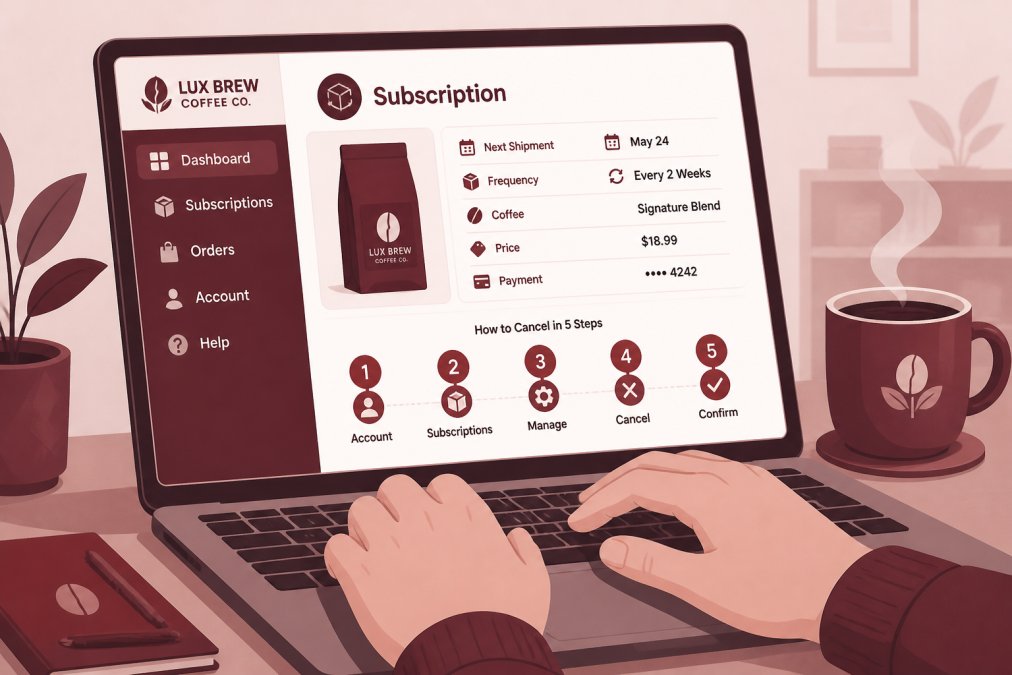
Step 1: Log Into Your Customer Portal
Visit your coffee subscription service's website and locate the login page. You'll need your email address and password. If you've forgotten your password, click "Forgot Password" and follow the reset instructions sent to your email. Once logged in, verify you're viewing the correct account, especially if you've had multiple subscriptions.
Step 2: Navigate to Account Settings and Subscription Dashboard
Look for a menu option labeled "Account," "My Account," "Settings," or "Subscription Management," typically in the upper right corner or sidebar. Your subscription dashboard shows your current plan details, billing cycle information, and upcoming deliveries. You should see options to pause, modify, or cancel your subscription.
Step 3: Review Your Billing Cycle and Cancellation Policy
Check when your next billing date is. Most services charge at the beginning of each billing cycle, so canceling before that date may still result in a charge for the upcoming shipment. Next, read the cancellation policy to understand whether you can cancel immediately, if you'll receive refunds for mid-cycle cancellations, and what happens to prepaid credits. This step prevents unwanted surprises.
Step 4: Submit Your Cancellation Request
Look for a "Cancel Subscription" or "Deactivate Account" button in your subscription dashboard. Click it to initiate cancellation. Most services will ask you to confirm and may prompt you to select a reason for leaving. After confirming, you should receive an on-screen message indicating your cancellation has been processed.
Step 5: Confirm Cancellation and Check Your Email
Check your email for a confirmation message containing your cancellation date, final billing date, and last shipment arrival. Save this email for your records. If you don't receive it within a few minutes, check your spam folder. If it doesn't appear after 30 minutes, log back in and verify your subscription status shows as "Canceled" or "Inactive."
Mobile App vs. Desktop Navigation for Cancellation
Many coffee subscription services offer mobile apps alongside their websites. Each approach has advantages.
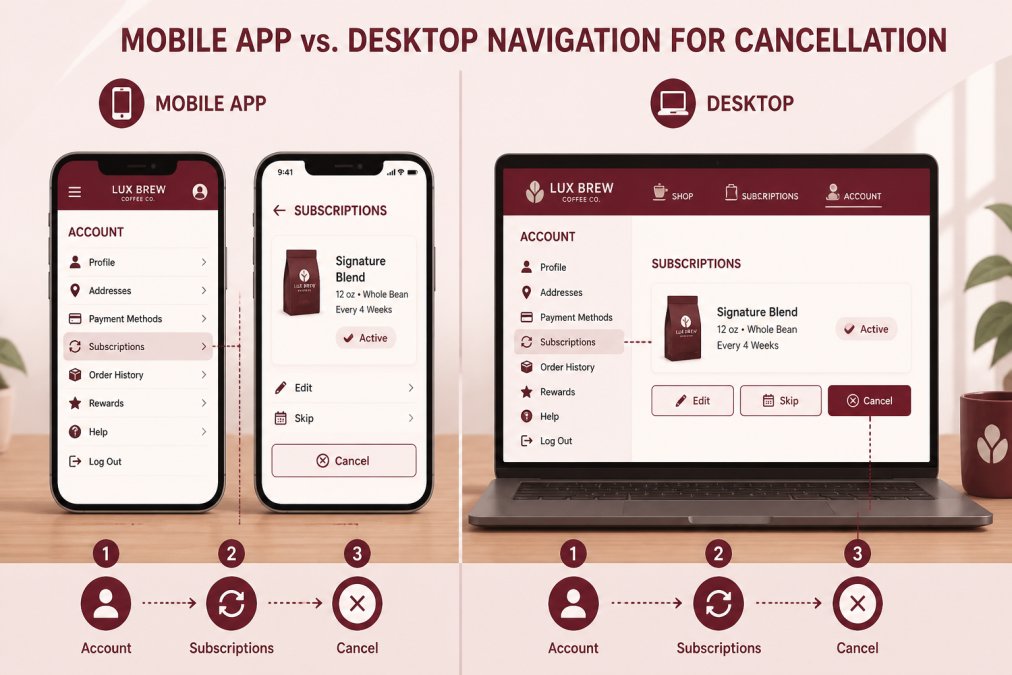
Desktop cancellation offers a more complete view of your account information. The larger screen makes it easier to read your cancellation policy, compare billing dates, and navigate menus. Desktop is better for first-time cancellations or thorough review.
Mobile app cancellation is faster if you know what you're doing. Most apps simplify the process to a few taps, though the smaller screen can make fine print harder to read. A practical approach is to start on desktop to review details, then complete cancellation on mobile if you prefer.
Pause Subscription vs. Cancel: Which Option Is Right for You
Before committing to cancellation, consider whether pausing might better suit your needs.
Pausing a subscription temporarily stops deliveries and billing without closing your account. Your information and preferences remain saved. You can typically resume within 30 to 90 days without re-entering details. This suits short breaks due to vacation, overstocking, or budget constraints.
Canceling a subscription permanently closes your account. You'll need to create a new account if you want to resubscribe later. Cancellation is right if you're switching roasters, permanently changing habits, or want a clean break.
The key difference is timeline. If you'll want to reorder within months, pausing is more convenient. If you're uncertain about returning or want to stop emails, cancellation makes sense. Check your account settings to see if pause is available.
How to Stop Automatic Credit Card Charges
If you've canceled but continue seeing charges, take immediate action. First, log in and verify your subscription status shows as "Canceled" or "Inactive." If it's still active, contact customer support immediately to confirm cancellation and stop charges.
If your account shows canceled but charges continue, contact your credit card company. Most issuers allow you to dispute unauthorized recurring charges through a chargeback. Provide your cancellation confirmation email as documentation. The company will investigate and typically reverse charges within 30 to 60 days.
As a preventive measure, you can also request your bank place a "stop payment" order on the merchant, blocking future charges. Use this as a last resort after exhausting direct contact with the service and your card issuer.
FTC Subscription Cancellation Rules and Your Rights
The Federal Trade Commission enforces strict rules protecting consumers. According to the FTC's Negative Option Rule, subscription services must make cancellation at least as easy as signing up. If you enrolled with one click, you should cancel with one click. If you signed up online, you must have the option to cancel online.
The FTC also requires companies to obtain your express informed consent before charging you, clearly disclosing all material terms including total cost, billing frequency, and cancellation policy. Companies must send you a confirmation email when you cancel, including the cancellation date and information about remaining benefits or refunds.
If a service violates these rules, you can file a complaint with the FTC's consumer complaint database or contact your state's attorney general office.
Subscription Cancellation Email Template You Can Use
If you prefer to cancel via email or your service requires email confirmation, use this template:
Subject: Subscription Cancellation Request - [Your Account Email]
Dear [Company Name] Customer Service,
I am writing to formally request cancellation of my subscription account associated with the email address [your.email@example.com].
Account Details:
- Email Address: [your.email@example.com]
- Subscription Type: [e.g., Monthly Coffee Subscription]
- Current Billing Cycle End Date: [date from your account]
Please cancel my subscription effective immediately and confirm cancellation via email. I understand that [mention any relevant policy detail, such as "charges for orders already shipped will not be refunded" or "my next shipment is scheduled for [date]"].
I request written confirmation of this cancellation, including the effective cancellation date and any information about remaining account credits or refunds.
Thank you for your assistance.
Sincerely, [Your Full Name] [Your Phone Number]
Keep a copy of this email and any response. If the company doesn't respond within 5 to 7 business days, follow up or contact their customer support phone line. This documented trail becomes valuable if you later need to dispute charges.
Troubleshooting: What to Do If Cancellation Fails
Problem: You can't find the cancellation option. Look for "Manage Subscription," "Billing Settings," or "Account Preferences." Check the help or FAQ section for step-by-step instructions. If the option doesn't exist online, contact customer support directly.
Problem: The cancellation button gives an error. Try clearing your browser cache and cookies, then log in again. Try the desktop website if using mobile, or vice versa. If the error persists, take a screenshot and contact customer support.
Problem: You receive confirmation but continue being charged. Contact customer support immediately with your confirmation email as proof. Ask them to manually verify your account is inactive and stop all future charges. Request written confirmation. If they don't respond within 10 days, contact your credit card company.
Problem: Customer support is unresponsive. Try contacting them through social media, leaving a review, or using a business contact database to find alternative email addresses. When all else fails, your credit card company can reverse unauthorized charges.
Contacting Customer Support for Cancellation Help
If you encounter problems, reaching customer support is your next step. Most services offer multiple contact options.
Email support is slowest but most documented. Allow 24 to 48 hours for response. Include your account email, subscription details, and what you've tried.
Phone support offers immediate assistance. Have your account information ready before calling.
Live chat provides faster response than email with a saved transcript. Look for a chat widget on their homepage.
Social media (Facebook, Instagram, Twitter/X) is surprisingly effective. Companies often respond quickly to public inquiries.
When contacting support, be clear and concise. State you want to cancel, provide your account email, and mention any problems. Keep your tone professional, support staff are more likely to help if you're respectful.
Canceling a coffee subscription should be straightforward. With these steps, you understand the process and your consumer rights. Whether you're pausing temporarily or switching services, take control of your subscription rather than letting it control your budget or coffee stockpile.
Frequently Asked Questions
How do I know if my coffee subscription has been successfully canceled?
Check your email for a cancellation confirmation message from your coffee subscription provider. Log back into your customer portal and verify that your account status shows 'canceled' or 'inactive' in your subscription dashboard. Your billing cycle should stop immediately, and no further automated payments should appear on your credit card. If you don't see confirmation within 24 hours, contact customer support with your order history and account credentials to verify the cancellation went through.
Can I cancel my coffee subscription through my bank instead?
Yes, you can stop automatic credit card charges by contacting your bank or credit card issuer to revoke authorization for recurring payments. However, this does not formally cancel your subscription with the coffee company. The service may attempt to collect payment again or suspend your account. The best approach is to cancel through your subscription dashboard first, then monitor your account for 1-2 billing cycles to confirm no charges appear. If charges continue after you've canceled through the portal, then contact your bank to dispute them.
What should I do if a coffee company makes it impossible to cancel my subscription?
Under FTC subscription cancellation rules, companies must make cancellation as easy as the original signup process. If you cannot find a cancellation option in your customer portal or account settings, send a written cancellation request via email to customer support with your full name, account email, and order history. Keep a copy of your email. If the company ignores your request within 30 days, file a complaint with the Federal Trade Commission (FTC) at reportfraud.ftc.gov. You may also dispute the charges with your credit card company if the merchant fails to honor your cancellation.
Should I pause or cancel my coffee subscription if I'm taking a break?
Pause your subscription if you plan to resume service within a few months. Pausing temporarily suspends your delivery and billing cycle without closing your account, so you keep your membership tier, preferences, and order history intact. Cancel only if you don't plan to return or want to end the relationship entirely. Pausing is also useful if you have too much coffee stockpiled, you can pause for one or more billing cycles and resume whenever you're ready without losing your account settings.
This article was written using GrandRanker